
Category: WordPress

blank

Elementor Widget Part 4: WooCommerce Product Integration

/ | Leave a Comment
# Introduction Now that we have a working widget with controls, it’s time to integrate WooCommerce products. In this part, we’ll query products, display them, work with product data, and create a basic grid layout. # Learning Objectives By the end of this tutorial, you will: Query WooCommerce products using WP_Query Build query arguments based […]
Read more »
blank

Elementor Widget Part 3: Building the Basic Widget Structure

/ | Leave a Comment
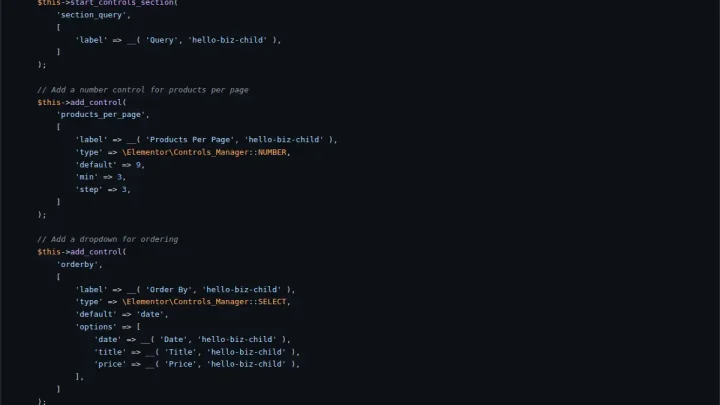
# Introduction Now that we understand how Elementor widgets work, it’s time to build the foundation of our Collection Products widget. In this part, we’ll create the widget files, implement the required methods, add basic controls, and register the widget with Elementor. # Learning Objectives By the end of this tutorial, you will: Create the […]
Read more »
blank

Elementor Widget Part 2: Understanding Elementor Widget Architecture

/ | Leave a Comment
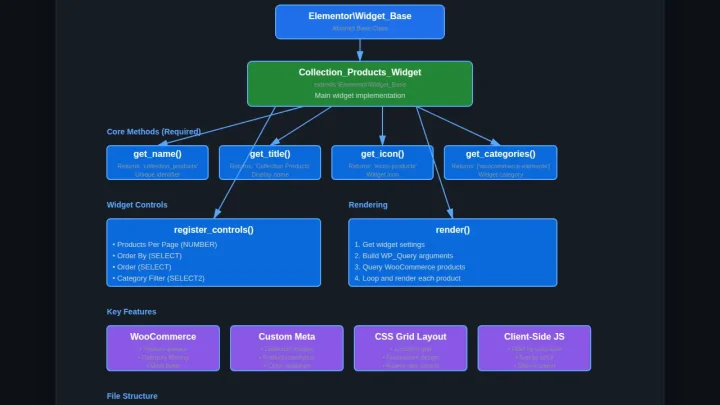
# Introduction Before we start coding our Collection Products widget, it’s essential to understand how Elementor widgets work under the hood. In this part, we’ll explore the widget architecture, learn about the base class, understand the widget lifecycle, and see how widgets integrate with the Elementor page builder. # Learning Objectives By the end of […]
Read more »
blank

Elementor Widget Part 1: Setting Up the Development Environment

/ | Leave a Comment
# Introduction Welcome to Part 1 of our tutorial series on building a custom Elementor WooCommerce widget! In this part, we’ll set up a complete development environment for building the Collection Products widget. Proper setup is crucial for smooth development and ensures compatibility with WordPress, WooCommerce, and Elementor. # Learning Objectives By the end of […]
Read more »
blank

Building a Custom Elementor WooCommerce Collection Widget – Tutorial Series

/ | Leave a Comment
# Introduction Welcome to this comprehensive tutorial series on building a custom Elementor widget for WooCommerce! In this series, you’ll learn how to create a “Collection Products” widget from scratch that displays WooCommerce products in a beautiful Pinterest-style grid layout with custom collection images, filtering, and sorting capabilities. # What You’ll Build By the end […]
Read more »
blank

Building a WordPress Plugin: Security, Styling, and Distribution Best Practices

/ | Leave a Comment
Throughout this series, a complete and functional Quick Note Manager plugin has been built from the ground up. The core features—admin management, AJAX-powered submissions, and frontend display via shortcodes—are all in place. The final stage of development involves polishing the plugin to ensure it is secure, visually appealing, and ready for distribution. This concluding article […]
Read more »
blank

Building a WordPress Plugin: Frontend Display with Shortcodes

/ | Leave a Comment
In our previous article, Implementing AJAX for Dynamic Content, we explored how to enhance the Quick Note Manager plugin by setting up AJAX for smoother and more interactive user experiences, covering client-side JavaScript, server-side PHP handlers, and secure data handling. With a fully functional administrative interface for managing notes, the next logical step is to […]
Read more »
blank

Building a WordPress Plugin: Implementing AJAX for Dynamic Content

/ | Leave a Comment
In the previous article, Building a WordPress Plugin: Creating the Admin Dashboard Page, a complete admin interface for managing notes was constructed. While functional, every action, such as adding a new note, requires a full page reload. This behavior can feel slow and outdated. Modern web applications provide a more fluid experience by updating content […]
Read more »
blank

Building a WordPress Plugin: Creating the Admin Dashboard Page

/ | Leave a Comment
This guide continues the development of the Quick Note Manager plugin. The first article, Building a WordPress Plugin: A Step-by-Step Guide,  established the plugin’s foundation, including the main file, a custom database table named wp_quick_notes, and activation/deactivation hooks to manage this table. The next phase focuses on creating a user-friendly administrative interface. A robust admin […]
Read more »
Editing SEO metadata in WordPress with Yoast plugin

Basic On-Site SEO Optimizations for WordPress Template Sites

/ | Leave a Comment
Building a WordPress website with a premade template gives you a head start on design, but it doesn’t automatically guarantee search engine optimization (SEO). WordPress is indeed SEO-friendly out of the box – it’s built with clean, semantic code that helps search engines index your content. However, leveraging a template means you still need to […]
Read more »
Chat on WhatsApp Chat on WhatsApp To top